



The big idea: How I use AI in my daily life
Reading time: 10 minutes

The most frequent question I get from friends, family, and readers is simple:
“Jack, how do you actually use AI?”
A friend asked me that on Saturday night, standing at the kitchen counter.
What this person meant, though, is something deeper. They do not want to fall behind.
I think a lot of people feel that right now. The world is moving quickly, AI is suddenly everywhere, and there is a quiet fear that everyone else has already figured it out.
They haven’t.
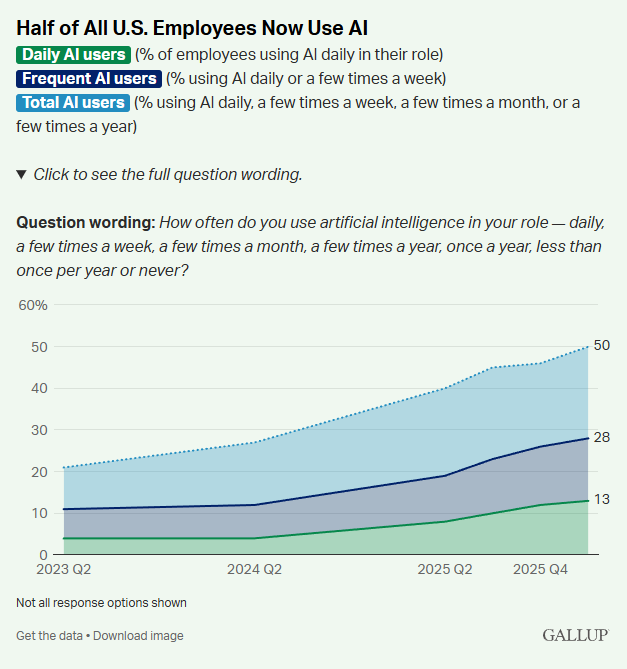
The data makes that clear. Gallup now shows that half of U.S. employees use AI in their role. But only 28% use it frequently, and just 13% use it daily. It is still early. Very early.
Most people are still using AI like a slightly better version of Google.
That alone is useful. I do it too. This morning I asked, “How many days until Mother’s Day?”
But AI is much more powerful than that. The more interesting shift happens when AI stops being a better search box and starts becoming your assistant. When it starts taking real work off your plate.
A lot of people may have tried AI now. Very few are using it anywhere close to its potential. In fact, the group using Agentic Coding is tiny, about 0.04% of the world’s total population.

So, good news. We are still super early and can learn this together.
Getting Started
By now, I assume most readers have tried at least one of the major AI products: ChatGPT, Claude, Gemini, or Grok.
I use all four.
ChatGPT is my all-around daily driver. Best overall product experience across desktop and mobile, broad tooling, strong multimodal capabilities, meaning text, photos, and video, and the easiest place to start.
Gemini is especially useful if you use Google Workspace. Gmail, Docs, Sheets, and Drive are all right there. Its image generation, Nano Banana, is also excellent.
Claude, and especially Claude Code, is where I go when I want to build software or create workflows that persist beyond a chat window. It is the difference between getting an answer and building a working system.
Grok is useful when I want a real-time read on the internet, especially around X, headlines, and what people are actually talking about right now.
You do not need all four. You just need to understand what each is good at.
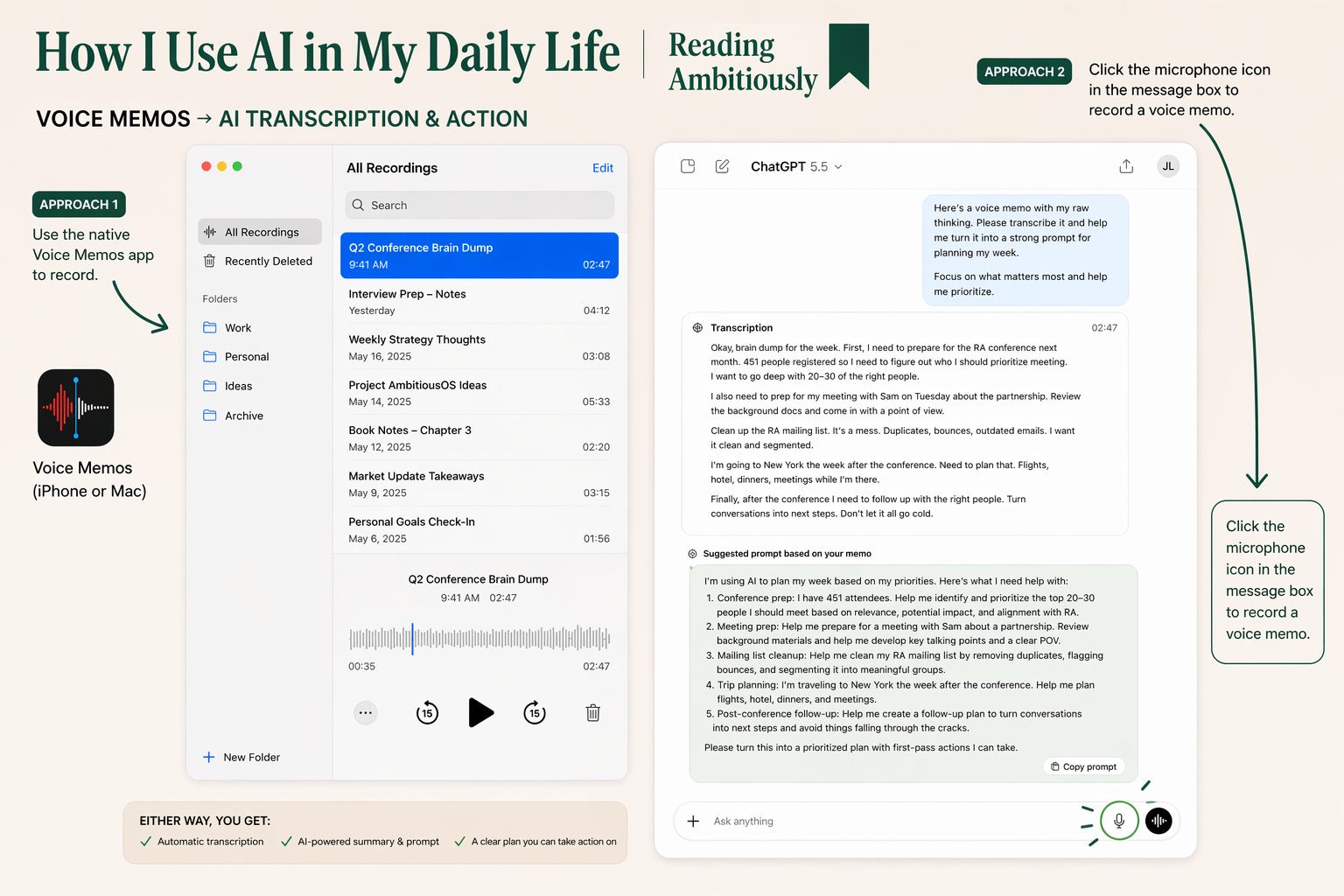
One practical tip before anything else: turn on voice.
The best way to interact with an LLM is often to talk to it. MacOS has native voice dictation. The apps do too. There are also paid tools like WhisperFlow that are even better. Over the course of a day, I often record a two- or three-minute stream-of-consciousness voice memo just to get the model started on my thinking.
Context and Prompts
Before I start any real project with AI, I think about two things: context and prompts.
Start with context.
The model can only work with what it can see. So before I ever type anything, I ask myself: what would I put on the table if I were doing this project manually?
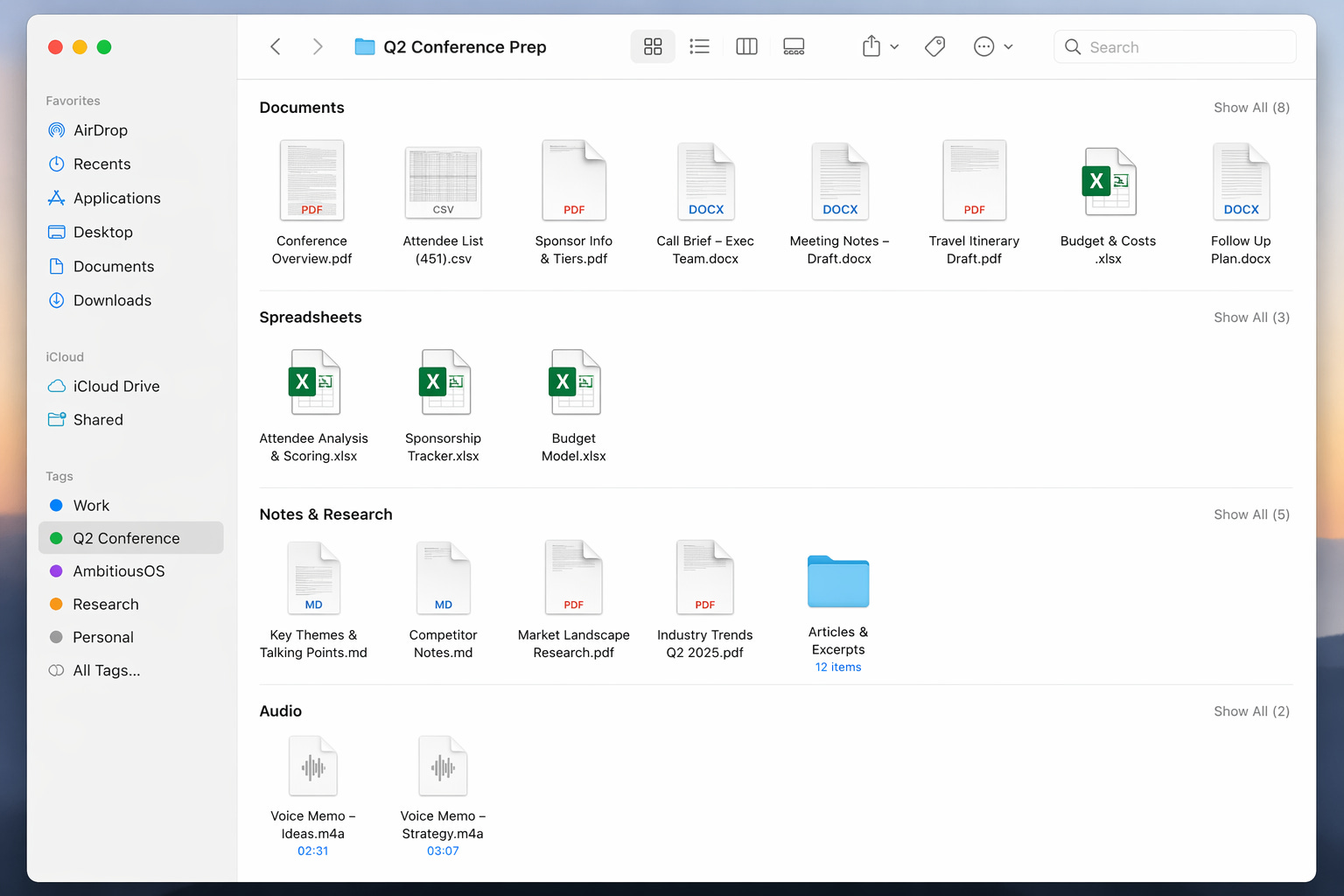
A spreadsheet. A few notes. A draft. An email thread. A PDF. Maybe some screenshots. Maybe a voice memo.
I think of context as the model’s working memory for the task at hand.
I often create a folder on my desktop and put everything in it before I start. Then I upload the whole thing to the model. If I want a good answer, I need to give it a good view of the problem.
Think of it like setting up shop at a library table. You want the right books open before you start working.
One small habit that helps: when I switch topics, I usually start a new chat. Context is useful until it becomes a distraction.
Then come prompts.
Yes, better prompts usually lead to better output. But people overcomplicate this.
One of the best prompting tricks I know is to ask the AI to help me write the prompt. Open a fresh chat and say: “I want your help writing a prompt for this project.”
Then paste in your rough notes, or, better yet, use a 2-minute voice memo to talk through what you are trying to do.
You will be surprised how good the model is at turning messy thinking into a clear instruction set.
When people ask how to begin, my advice is simple: start with work you already understand.
The best first projects are usually in areas where you already have expertise. That is how you build confidence. You know what good looks like, so you can tell whether the model is actually helping.
In many ways, what I built with AmbitiousOS is basically Reading Ambitiously turned into software.
That is a useful way to think about AI more broadly. Start with tasks where you already know the destination. Let the model help you get there faster.
The hardest part of AI is not understanding the theory. It is seeing where it fits into the flow of an ordinary day.
Which is why I like starting with a to-do list.
The To-Do List
I love a good to-do list. I make a lot of them.
I have tried every application out there to help me organize and make lists. And maybe it is the technology overload of 2026, but these days I still like to do my best thinking with a pen and paper, away from the electrons.
There is an old story about a man who walked up to J.P. Morgan and said, “I have the secret to success in this envelope, but it will cost you $10,000.” Morgan asked to see it first. He opened the envelope. Inside was a single line: “Make a list and do it.” Morgan shook his head and paid the man.
That is usually where my day begins, with a pen, a legal pad, and a list of what is actually on my mind.
On Monday, it looked something like this.
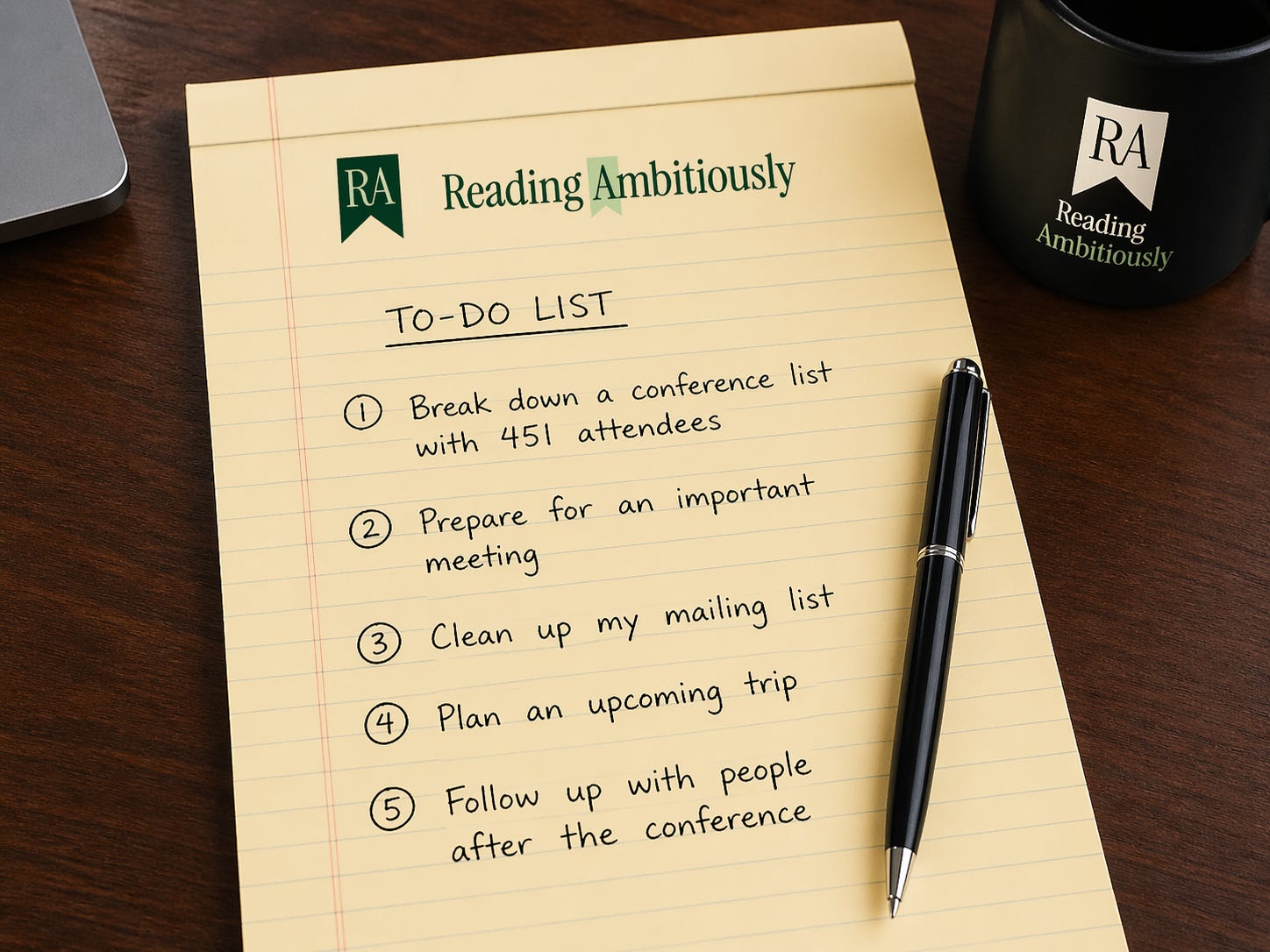
Before AI helps me do the work, I need to know what the work actually is. A handwritten list helps me think through it.
Then I make a simple move. I take a picture of the list, drop it into ChatGPT, and say: “Turn this into a plan. Do the first pass on anything you can.”
That is the first handoff to AI.
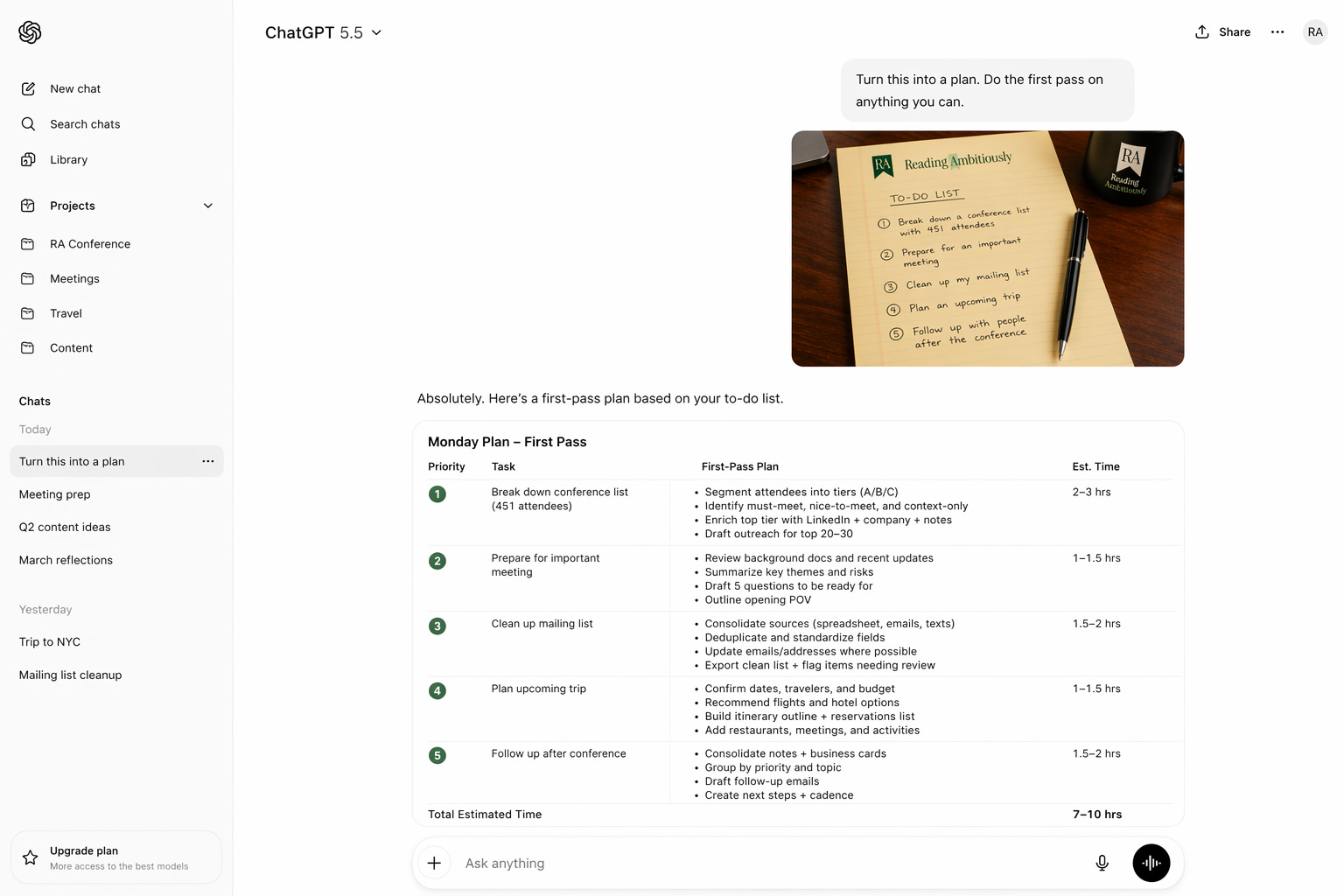
From there, each line item starts to change shape. One becomes a research brief. One becomes a prioritization engine. One becomes a cleanup job I have been putting off. And in a few cases, once I know the workflow is worth repeating, if I need to move from ChatGPT into Claude Code and build something more durable, I will.
Here is what that looked like across a real day.
1. 451 Attendees, 20 Conversations That Matter
A spreadsheet with 451 names is not a plan. It is just a lot of rows.
So I start by giving ChatGPT the file and a little context on the conference, who I want to meet, and what a good outcome would look like.
“Hey ChatGPT, I’m headed to a conference and 451 people are registered. Help me break this list down, prioritize the people I should care most about, find their LinkedIns, and give me a short note on why each one matters. Then draft outreach for the top group.”
I am no longer staring at 451 names. I am reviewing 20 decisions.
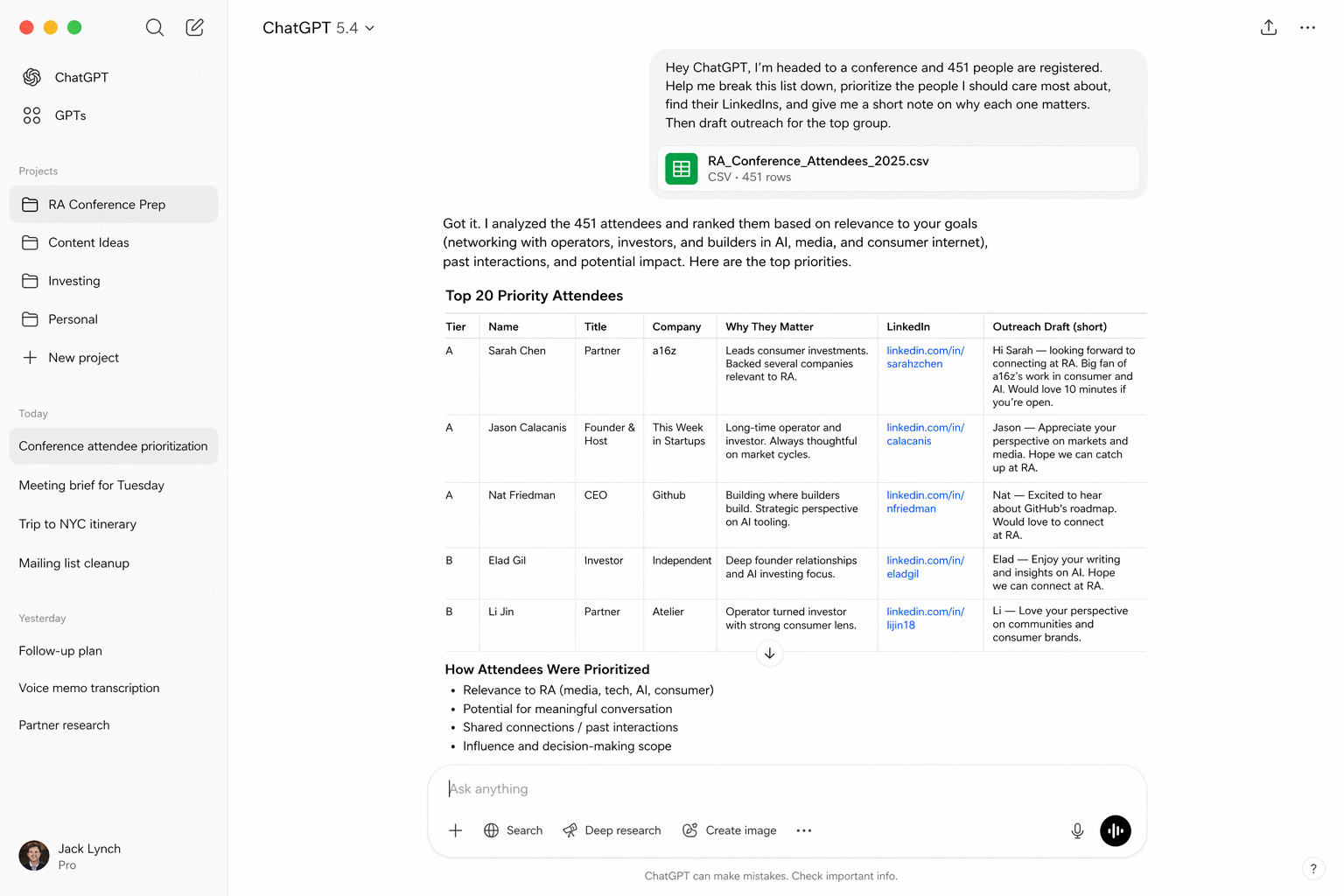
If I want that to become a reusable system, with enrichment, scoring, and tracking, that is when I move it into Claude Code.
2. The Meeting Brief
This is one of my favorite ChatGPT use cases because it is so close to how a real assistant should work.
I gather the emails, notes, research, and background materials, then I hand over the problem.
“Hey ChatGPT, I have an important meeting coming up. I’m uploading the background here. Put together a brief for me. Give me the key themes, what has changed recently, what I should watch out for, five questions I should be ready for, and a draft of the point of view I want to open with.”
What comes back is usually a much more complete view of the room I am walking into.
This one is mostly ChatGPT end-to-end.
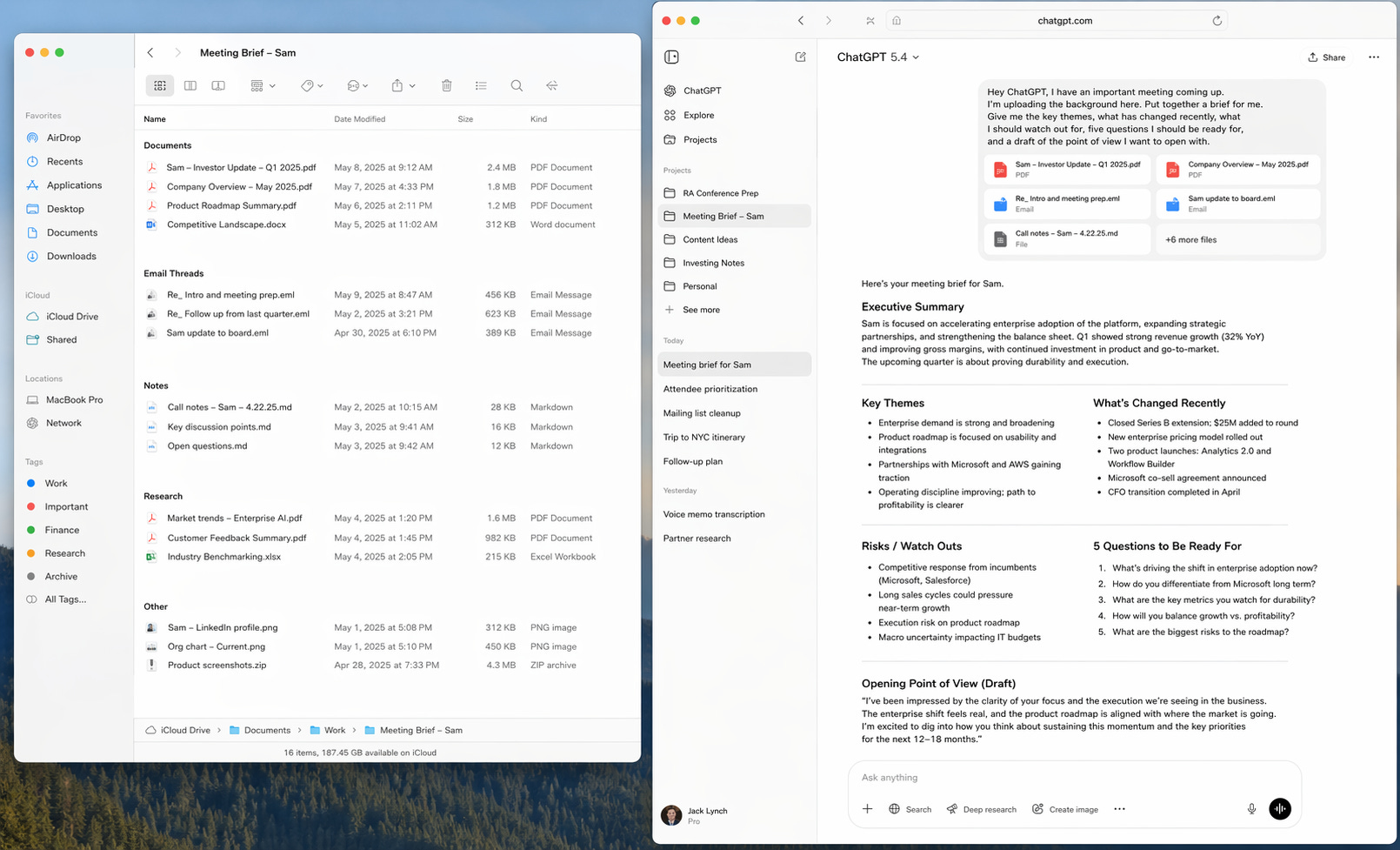
I treat much of this the same way I would a smart junior analyst. Incredibly useful for a first pass. Still worth checking before I bet something important on it.
3. The Mailing List, or the Work You Avoid
This is the kind of task that sits around longer than it should.
An old spreadsheet. Outdated addresses. Random fixes scattered across texts and emails. Not hard work, just annoying work.
“Hey ChatGPT, this mailing list is a mess. I’m giving you the old Excel file, some emails, and text updates. Reconcile everything you can, clean it up, standardize the format, and flag anything that still needs a human look. Oh, and please give me the final output in XLS. Thank you.”
What comes back is a cleaned-up file. Instead of being something I will get to eventually, it gets finished.
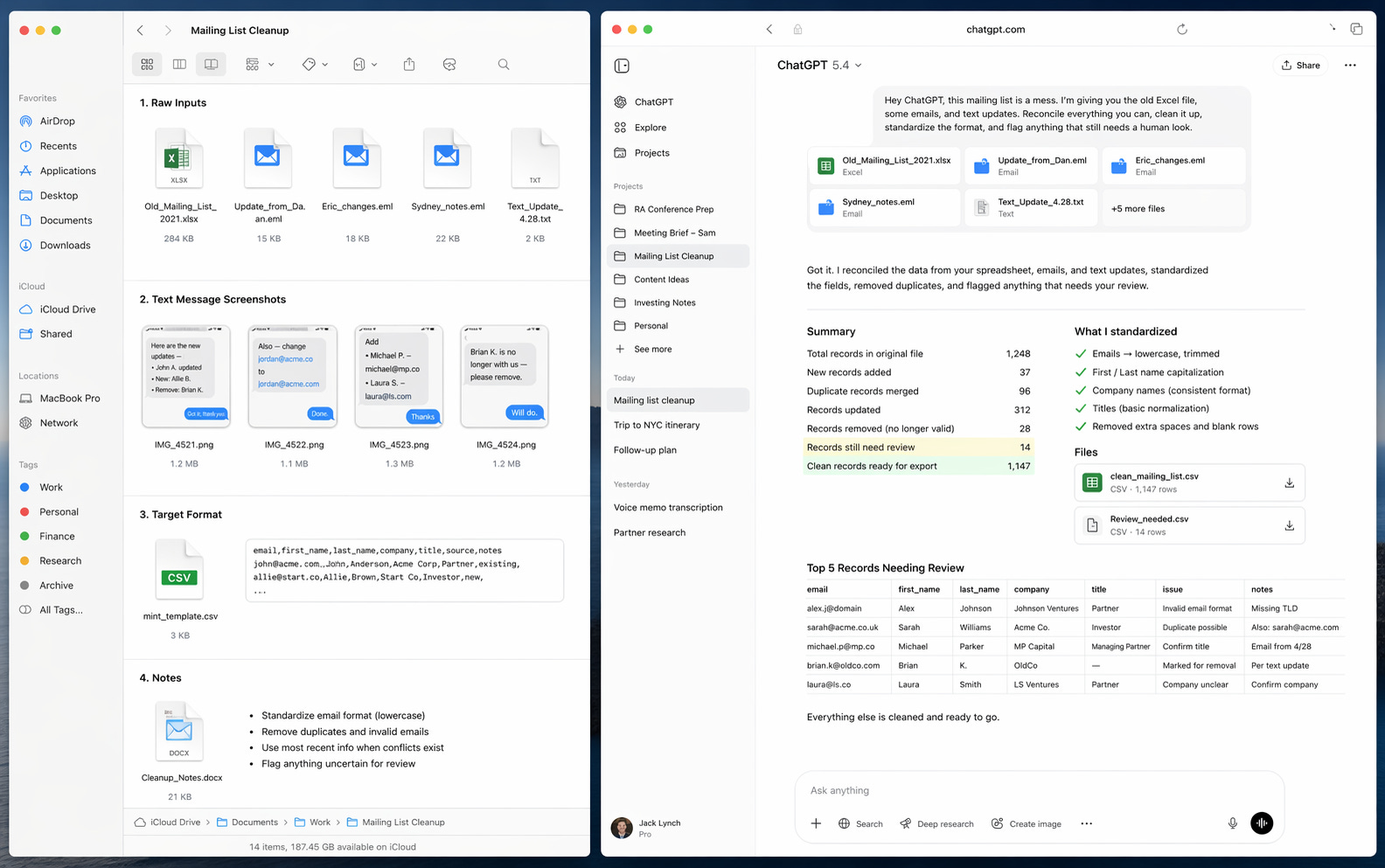
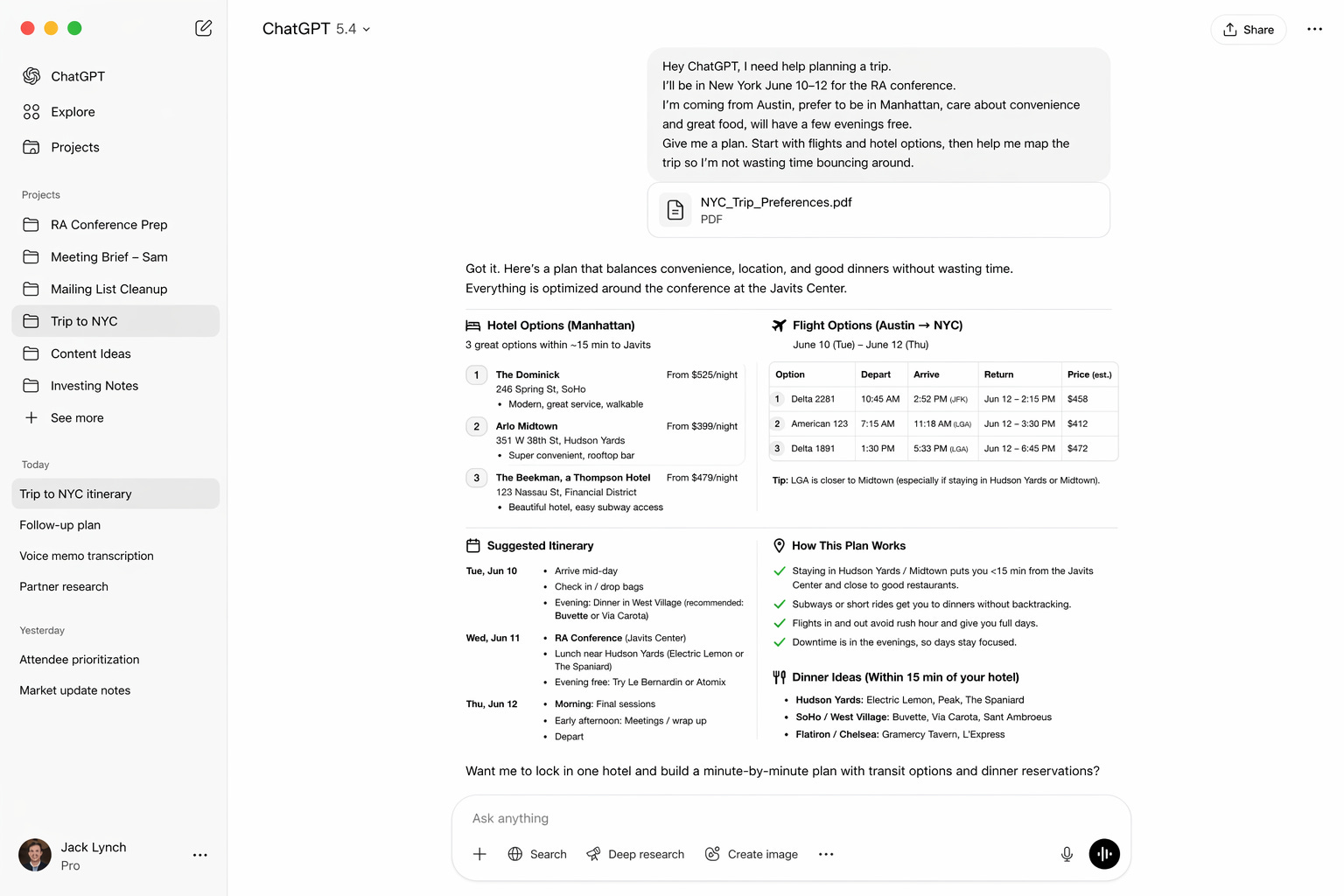
4. Trip Planning, From Searching to Steering
Travel is a perfect example of something AI handles well because the inputs are clear and you have to do a ton of research.
Dates. Preferences. Budget. Meetings. Restaurants. Logistics. Too many Chrome tabs.
“Hey ChatGPT, I need help planning a trip. Here are my dates, where I need to be, who’s coming, and what matters most. Give me a plan. Start with flights and hotel options, then help me map the trip so I’m not wasting time bouncing around.”
What comes back is not a final answer so much as a strong first draft.
5. The Follow-Up, Where Value Is Won or Lost
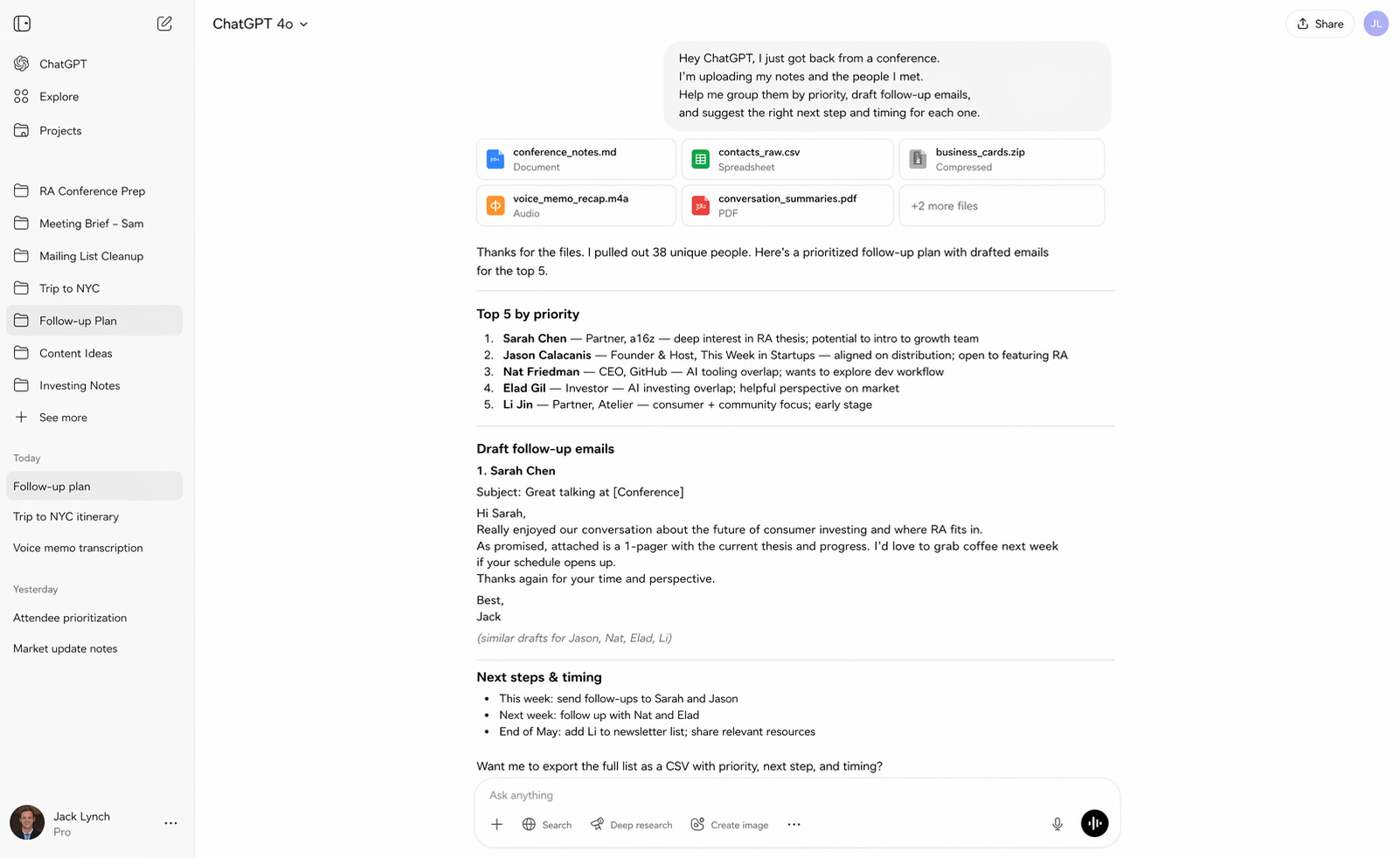
This is where good work often dies. Not in the meeting, but after it.
You have notes, business cards, partial memory, and every intention of following up well.
“Hey ChatGPT, I just got back from a conference. I’m uploading my notes and the people I met. Help me group them by priority, draft follow-up emails, and suggest the right next step and timing for each one.”
What comes back is a system where there used to be a pile.
People get grouped. Emails get drafted. Next steps get named. Nothing falls through the cracks.
Where Each Tool Fits
When people ask how I use AI, they are usually asking about which tool.
The more useful way to think about it is layers.
Some work is about thinking. Some is about doing. And some is about building something you can reuse.
ChatGPT is where most workflows begin and often end. It is my default for research and synthesis, structuring messy problems, drafting and summarizing, and getting to a strong first version quickly.
That is why it shows up so clearly in the meeting brief and trip planning. Those are thinking problems.
Claude Code shows up when the work needs to persist.
When something moves from a one-time task to something I will do again, I start to think differently. Can this become a tool? Can this run the same way every time? Can I remove myself from the loop entirely?
That is where Claude Code becomes useful.
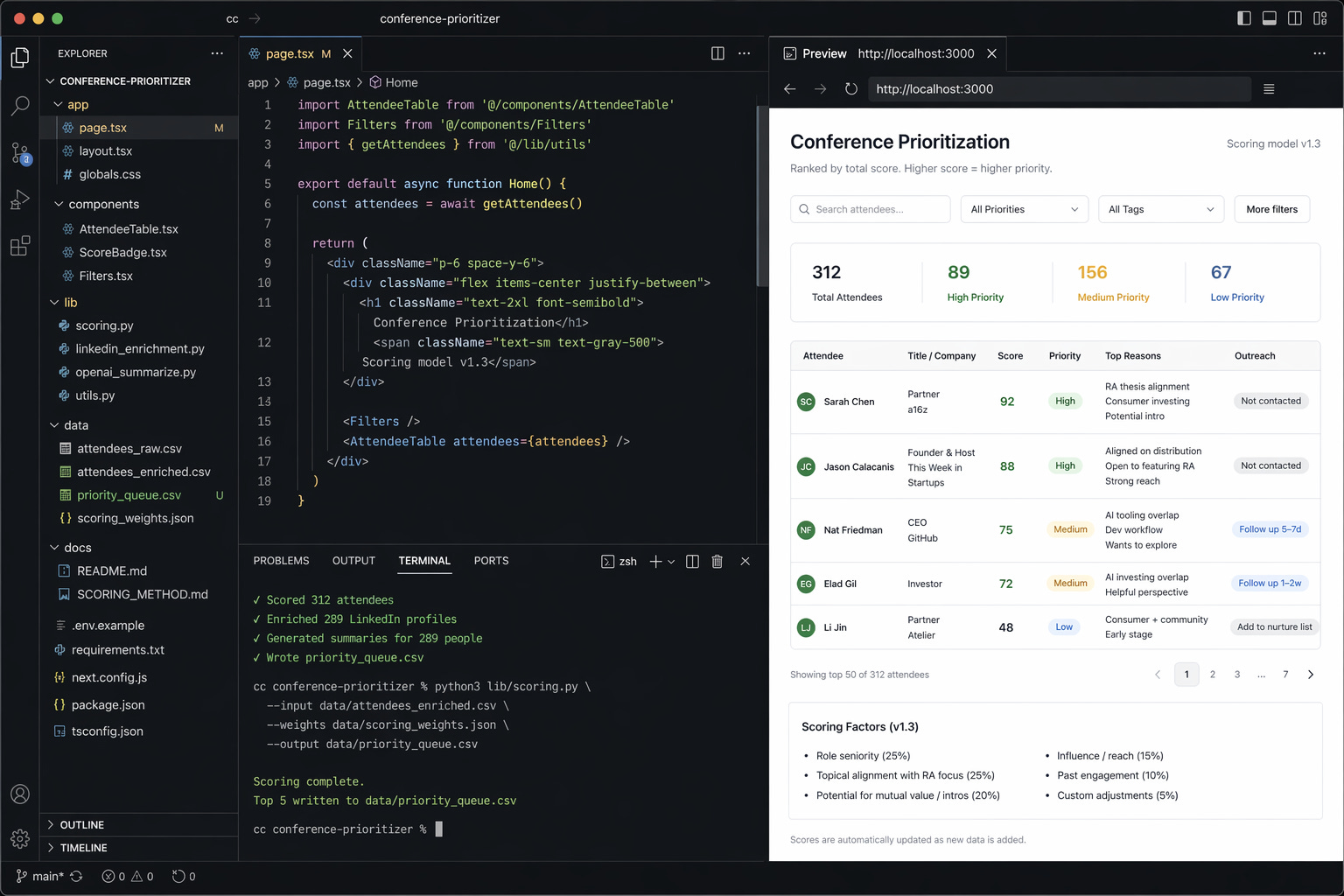
The conference list if I want a reusable prioritization system. The mailing list if I want a repeatable transformation pipeline. The follow-up process if I want a system that tracks status and cadence.
ChatGPT gets me to the answer. Claude Code helps me build the system.
Most people do not need to start with Claude Code. They need to start with ChatGPT or Gemini and get comfortable handing off pieces of their work. But once a workflow proves valuable, the next question becomes obvious: should this be a one-off, or should it run the same way every time?
That is where the second layer begins and where Claude Code can help you turn that conference attendee list into an AI-based system you can use every time.
Why it matters
When I step back, three things consistently show up: context, clarity, and tools.
Context means gathering everything into one place. Documents, notes, files, screenshots, voice memos. The model works best when it has the full picture.
Clarity means not overengineering prompts. Explain the task, what good looks like, and where you need help.
Tools means accepting that you are not choosing one product. You are assembling your personal AI stack. ChatGPT is my default. Grok for real-time awareness. Gemini for images. Claude Code, when I want to build something repeatable.
Half of people may have tried AI. Most are still using it like Google 2.0.
The shift is learning what can be handed off and what is worth turning into a system. That second step is where things start to compound.
To my friend at the kitchen counter, the answer is not really which AI tool to use. It is time to think differently about your work.
Start with your list and ask a simple question: What can the AI do for me?
Stay ambitious.

Best of the rest:
🔐 Anthropic’s Mythos Model Is Being Accessed by Unauthorized Users — If frontier models can leak before controlled rollouts even begin, the real bottleneck in AI may be security and distribution, not just raw capability. — Bloomberg
⚙️ Thin Harness, Fat Skills — The real unlock in AI coding isn’t smarter models but better architecture, where lightweight wrappers and reusable “skills” turn LLMs into compounding systems rather than one-off tools. – Garry Tan
🍎 Community Letter from Tim – Tim Cook’s handoff to John Ternus is more than a succession note, it is Apple signaling continuity, stability, and a product-led future at one of the world’s most important companies. – Apple
🤖 Sign of the future: GPT-5.5 – Ethan Mollick’s real point is not just that GPT-5.5 is better, but that the compounding gains across models, apps, and tooling are making AI meaningfully more useful even as the jagged frontier still has not disappeared. – One Useful Thing
🏢 Inside BlackRock’s AI Transformation - BlackRock is moving from AI experimentation to enterprise-wide execution, with a no-code agent platform that lets employees across the firm build and deploy agents, a sign that the real AI race inside large institutions is shifting from models to workflow redesign. - The Wall Street Journal
🚀 xAI Explored Collaborating With Mistral and Cursor — Musk’s AI ambitions are colliding with reality, forcing xAI to look outward for partnerships as the frontier race consolidates around a few dominant players. — Business Insider
☁️ Google Deepens Thinking Machines Lab Ties With New Multi-Billion-Dollar Deal — Google is locking in scarce AI demand early, betting that owning the compute layer for next-gen labs like Mira Murati’s will pay off as model training scales exponentially. — TechCrunch
🧠 The peril of laziness lost — LLMs are supercharging output but eroding the core engineering virtue of thoughtful abstraction, risking a future of bloated systems optimized for speed over simplicity. – Bryan Cantrill

Charts that caught my eye:
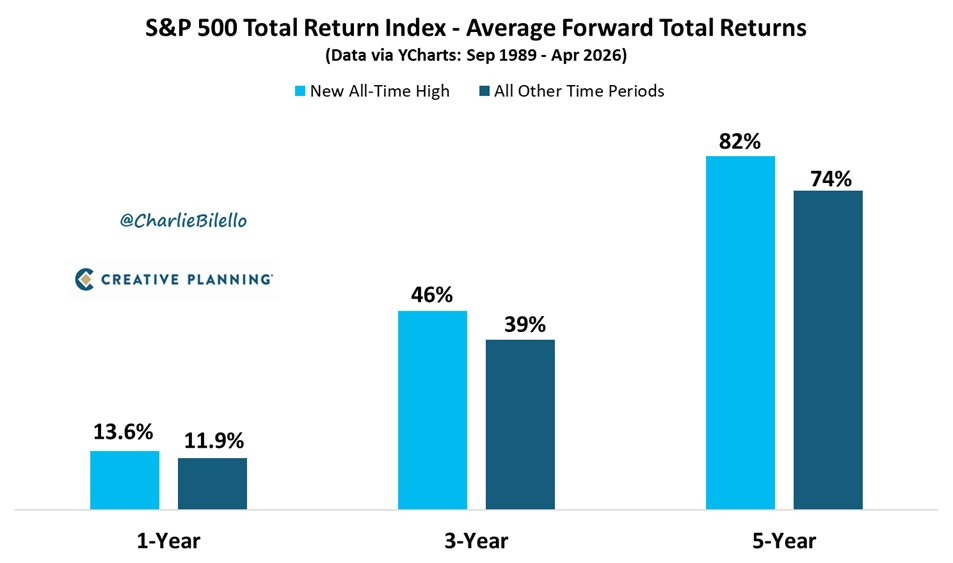
→ Why does it matter? All-time highs feel like bad entry points. The data disagrees. Buying at peaks has historically beaten buying on a random day across every time horizon shown, which suggests “wait for a pullback” is often just dressed-up hesitation.
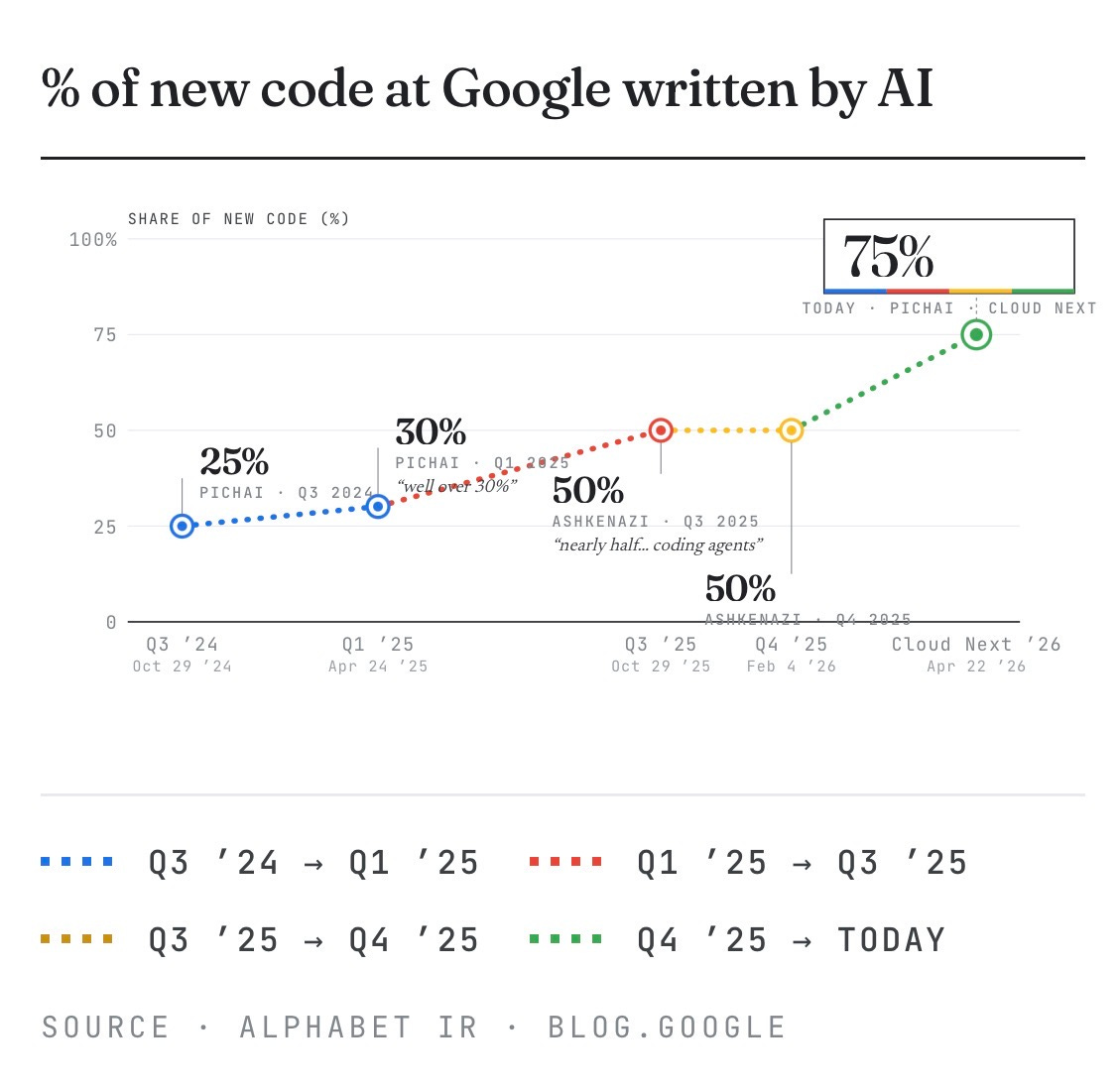
→ Why does it matter? At 75%, Google is approaching a point where human engineers review AI code more than they write it.
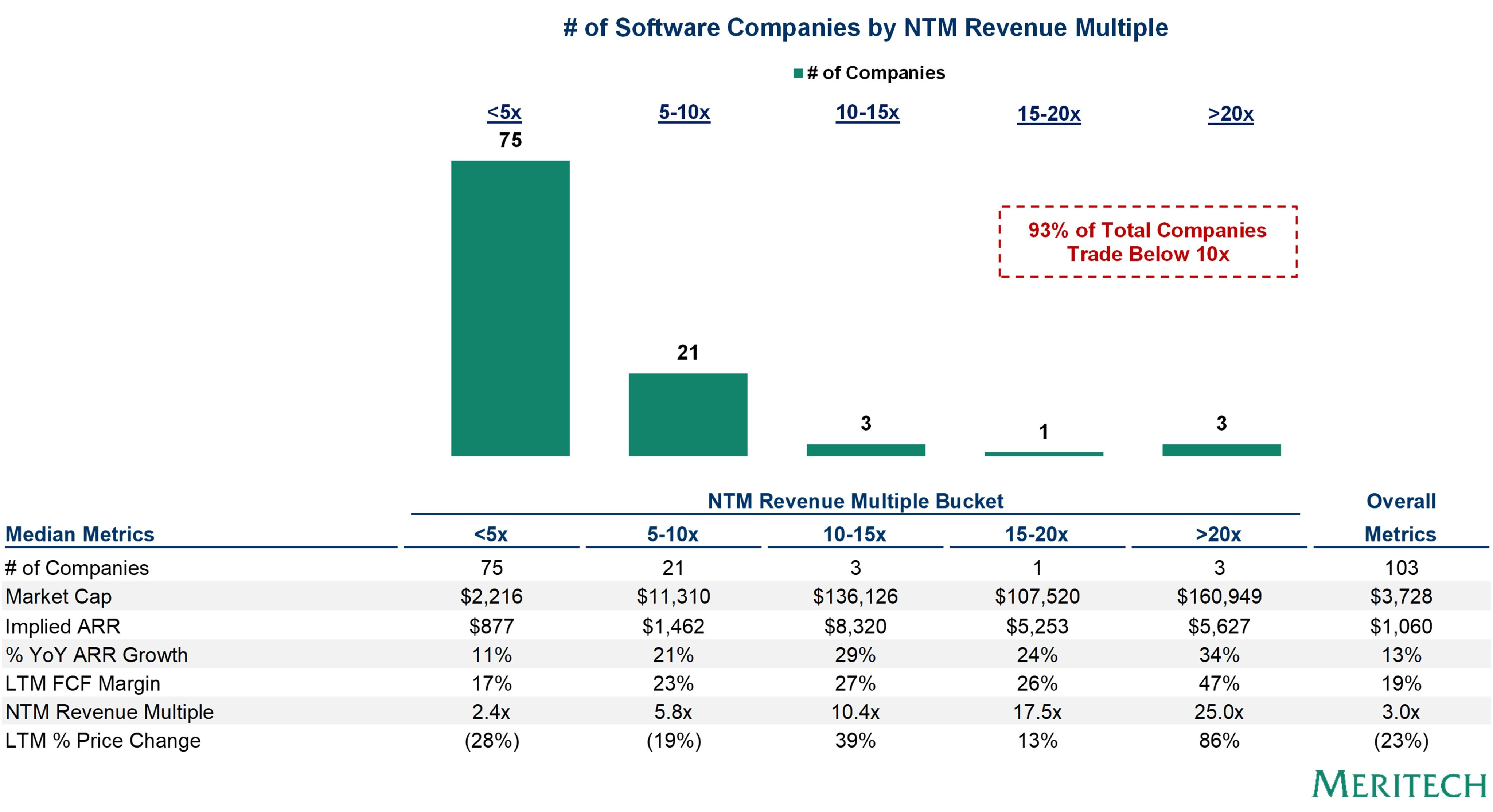
→ Why does it matter? The public SaaS market has effectively split into two economies: 96 companies grinding below 10x, and 7 commanding 10x or more. The separating factor looks less like growth and more like AI relevance. If your product isn’t in the labor-replacement conversation, the market is pricing you like a legacy business.

Tweets that stopped my scroll:

→ Why does it matter? This one lives rent-free in my head often: if FTX had not collapsed, its startup investment portfolio would be worth over $100 billion today. 🤯

→ Why does it matter? Thoma Bravo paid $6.4B for Medallia in 2021 and is handing it over to creditors, leaving nothing for equity. 2021 was a tough vintage.

→ Why does it matter? Perplexity’s AI computer looks genuinely so cool. Cannot wait for my Mac Mini to arrive.
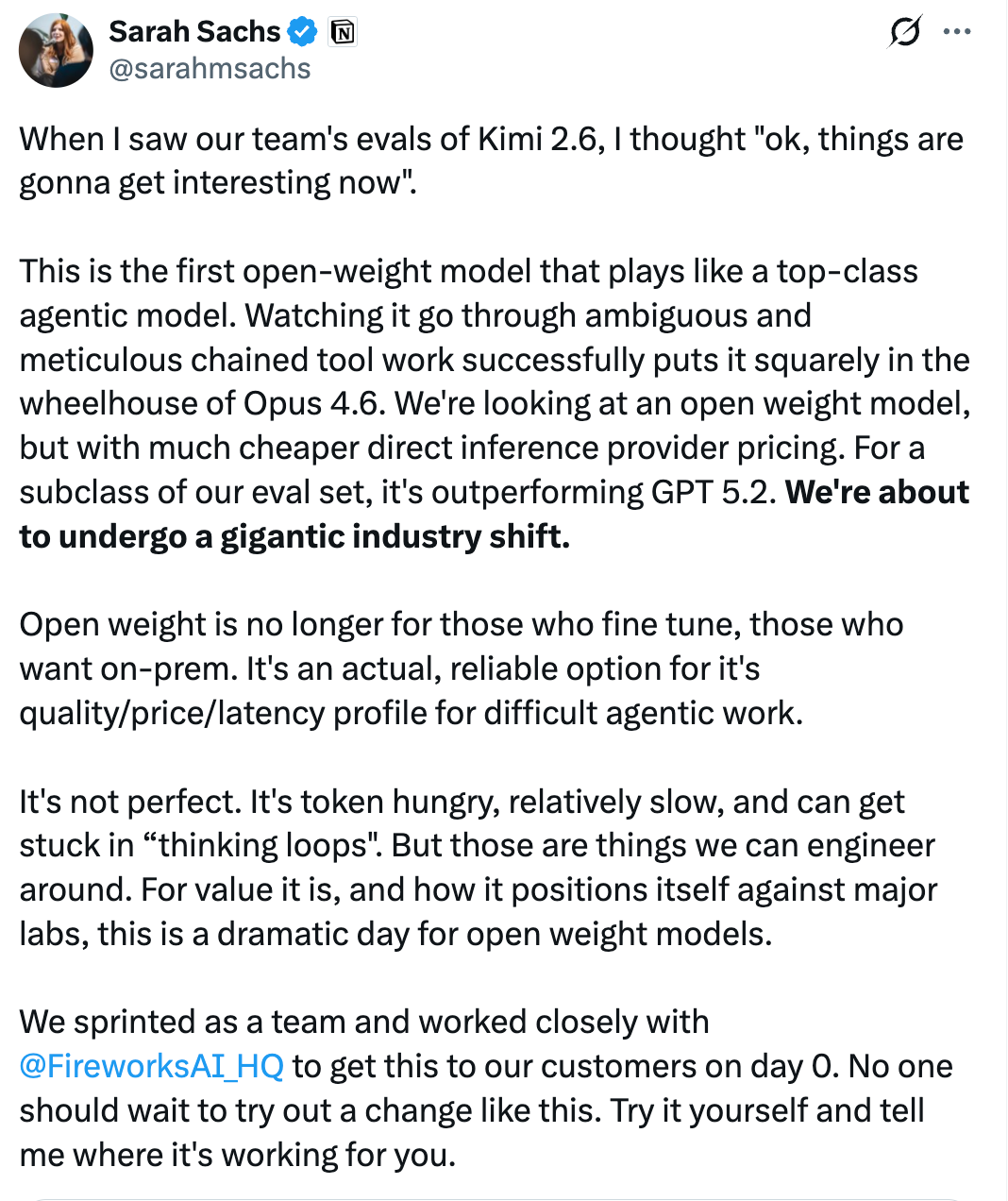
→ Why does it matter? Kimi 2.6 is the first open-weight model competitive with top closed models on agentic tasks, at cheaper inference costs. I truly think open source could be the black swan in this whole thing.

→ Why does it matter? Enterprise AI adoption is a services problem as much as a software one. Legacy systems, fragmented data, and change management mean consultants.

→ Why does it matter? OpenAI is moving ChatGPT from a personal tool to a team infrastructure play. Shared agents that persist across workflows put it in direct competition with Zapier, Notion, and enterprise automation software. Rumor has it that Anthropic might be buying Atlassian for this reason.


Worth a watch or listen at 1x:
→ Why does it matter? Rabois has strong opinions on which AI startups are building on borrowed time and which archetypes will actually survive. Many hot takes from someone who has seen enough cycles to back them up.
→ Why does it matter? OpenClaw creator Peter Steinberger takes us back to the transformative moment he let his AI agent loose on the internet, igniting one of the world's fastest-growing open-source projects.
→ Why does it matter? This was one of the most talked-about 1-minute segments of any podcast in the past ~10 days.
→ Why does it matter? Can’t wait!

Quotes & eyewash:
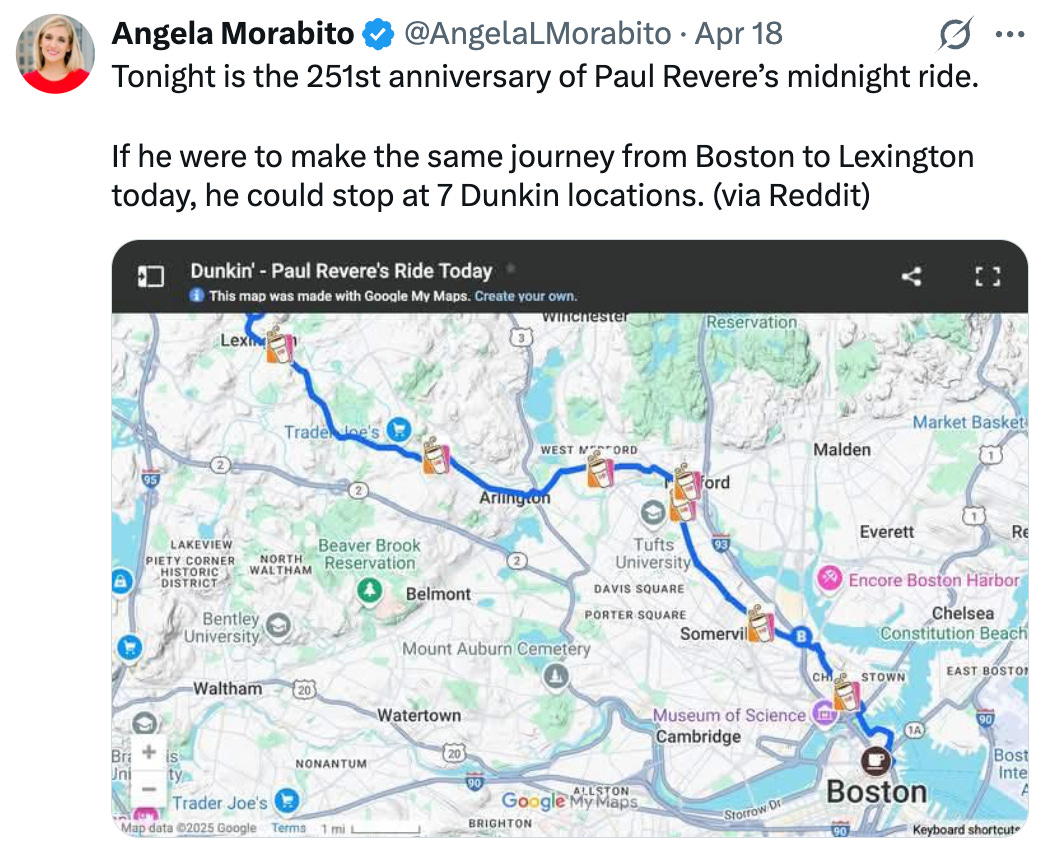
→ Why does it matter? Seven Dunkin stops turn a legend into a commute. Have to love the USA.
The mission:
The Wall Street Journal once used “Read Ambitiously” as a slogan, but I took it as a personal challenge. Our mission is to give you a point of view in a noisy, changing world. To unpack big ideas that sharpen your edge and show why they matter. To fit ambition-sized insight into your busy life and channel the zeitgeist into the stories and signals that fuel your next move. Above all, we aim to give you power, the kind that comes from having the words, insight, and legitimacy to lead with confidence. Together, we read to grow, keep learning, and refine our lens to spot the best opportunities. As Jamie Dimon says, “Great leaders are readers.”
Disclaimer: This content is for informational purposes only and does not constitute financial, investment, or legal advice. Readers should do their own research and consult with a qualified professional before making any decisions.